Production-style n8n workflows that combine triggers, LLMs, AI agents with tools, RAG, Google Workspace, Slack, WhatsApp and Notion. Each one below is built on n8n Cloud; its status badge shows whether it is tested and published. Download the JSON and import it into your own n8n.
Every time a new client request lands in a Google Sheet (e.g. from a web form), the client gets an instant thank-you email, is saved to Google Contacts, and I receive a summary notification.
Live n8n canvas · exported from n8n Cloud
What it does
Polls the sheet for new rows (name, email, phone, description)
Personalised reply to the client by name
Splits full name into given / family name for the contact
Sends an internal alert with the request details
Tested
Multiple successful end-to-end runs on n8n Cloud
Published (active) on the Google Sheets trigger
Google Sheets TriggerGmailGoogle ContactsExpressions
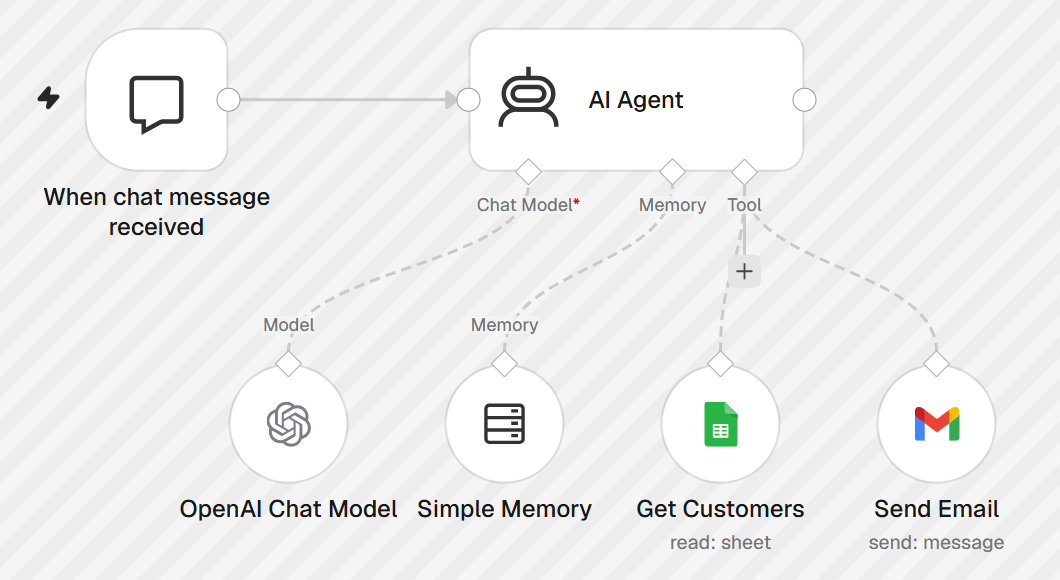
A chat-driven AI agent. Ask it in plain English to email a customer by name — it looks the customer up in a Google Sheet database, writes a personalised email from your message and sends it through Gmail.
Live n8n canvas · exported from n8n Cloud
What it does
Understands the request: who to email and what to say
Finds the customer's address in the sheet (Full Name, Email, Phone)
Never guesses an address — asks if no match or several matches
Composes and sends the email, then confirms recipient and subject
Tested
Prompt: “Send an email to Suleman Safdar thanking him for his order…”
Agent called Get Customers (4 rows) → Send Email (1 sent)
Small-talk messages correctly answered without tool calls
AI AgentTool callingOpenAIMemoryGoogle Sheets ToolGmail Tool
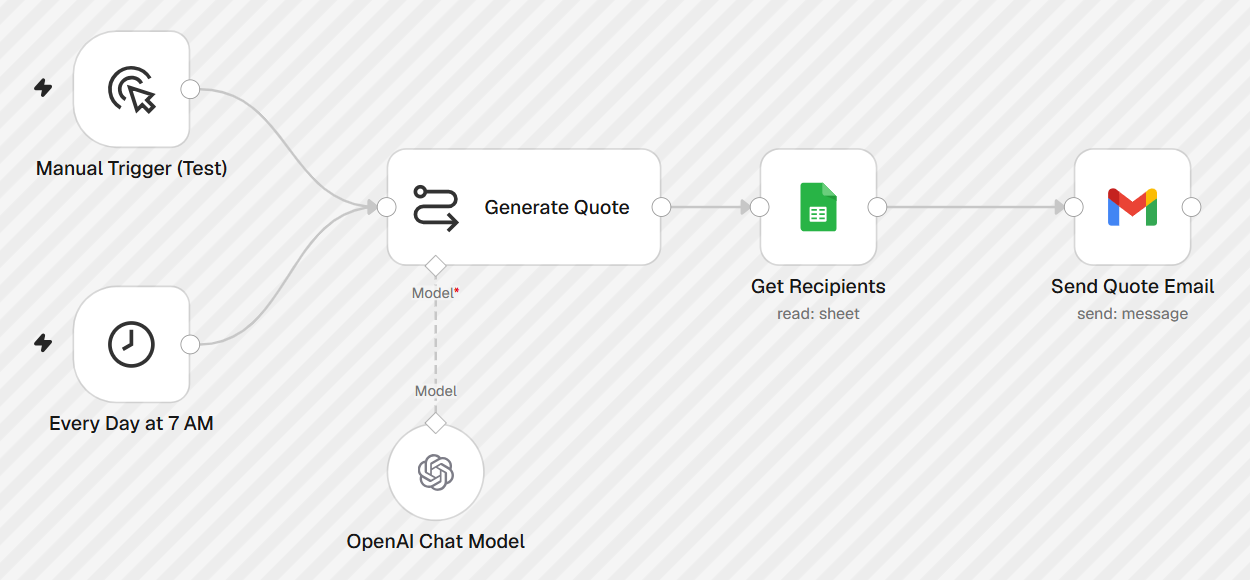
Every morning at 7 AM (Asia/Karachi) an LLM writes a fresh motivational quote with a one-line tip, and every recipient in a Google Sheet gets a personalised “Good morning {name}” email.
Live n8n canvas · exported from n8n Cloud
What it does
One quote generated per day, shared across all recipients
Recipient list managed in a Google Sheet (Name, Email)
Manual trigger kept for testing alongside the schedule
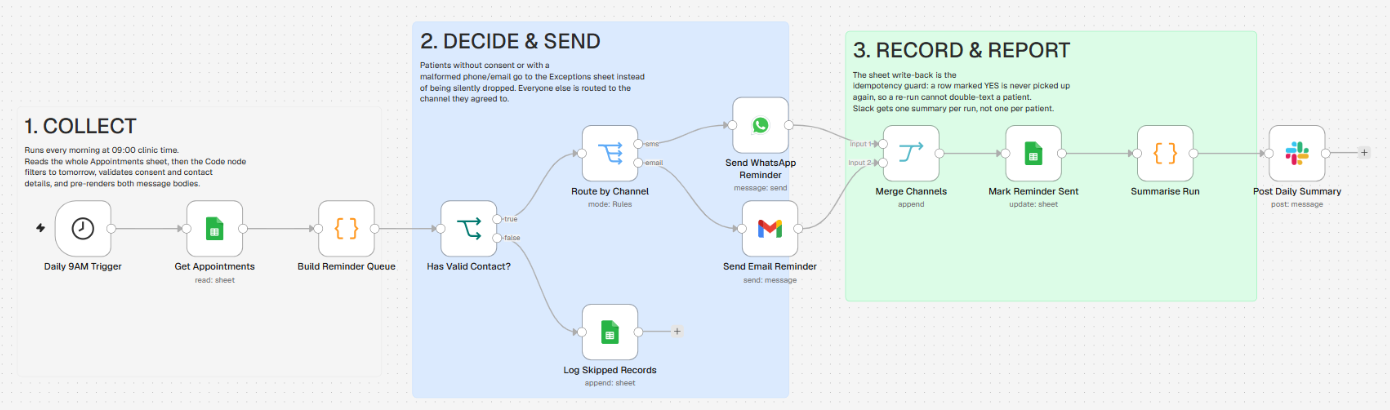
A daily clinic automation. Every morning it reads the Appointments sheet, finds tomorrow’s patients, and reminds each one on the channel they consented to — WhatsApp or email. Invalid records are logged, not dropped, and the team gets one Slack summary per run.
Live n8n canvas · exported from n8n Cloud
What it does
Code node filters to tomorrow, skips cancelled or already-reminded rows and validates consent, phone and email
Routes each patient to WhatsApp or Gmail and pre-renders both message bodies
Marks the row reminder_sent = YES so a re-run never double-messages a patient
Patients with missing consent or bad contact details go to an Exceptions sheet
Tested
Successful runs on n8n Cloud, both manual and on the 09:00 schedule
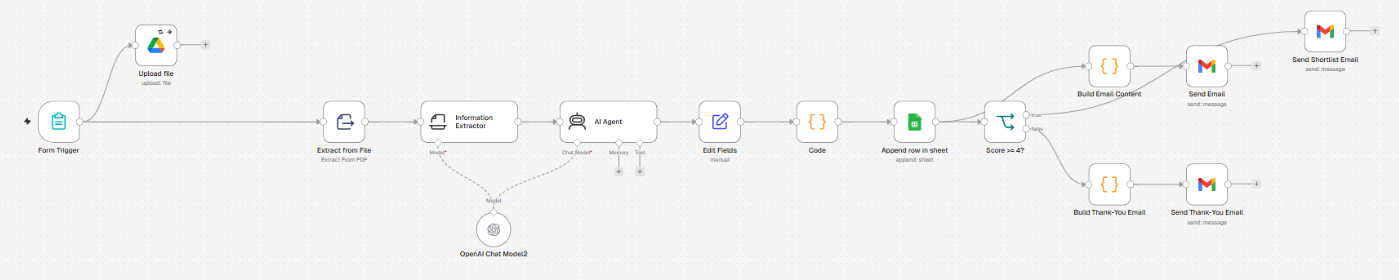
A candidate-screening pipeline behind a public n8n form. Applicants upload a PDF CV; the workflow stores it in Google Drive, extracts the text, has an AI agent score the candidate and logs the result to a sheet — then emails a shortlist report or a polite thank-you depending on the score.
Live n8n canvas · exported from n8n Cloud
What it does
Form collects name, email and CV (PDF) and saves the file to Google Drive
Information Extractor pulls structured fields (name, email, phone, skills…) from the CV
AI Agent writes an evaluation with a 1–5 score; a Code node parses it
The inbox version of the CV screener. When an email with a PDF résumé arrives, the attachment is archived to Google Drive, parsed and scored by an AI agent, logged to a sheet, and the applicant gets a reply in the same Gmail thread.
Live n8n canvas · exported from n8n Cloud
What it does
Gmail Trigger watches for emails with PDF résumé attachments
Uploads the CV to Drive, downloads it and extracts the text
Information Extractor + AI Agent produce structured fields and a scored evaluation
Replies in-thread: detailed report if score ≥ 4, otherwise a short thank-you
Tested
Successful manual end-to-end run on n8n Cloud
Published (active) on the Gmail Trigger
Gmail TriggerGoogle DriveExtract from FileInformation ExtractorAI AgentOpenAIGoogle SheetsGmail
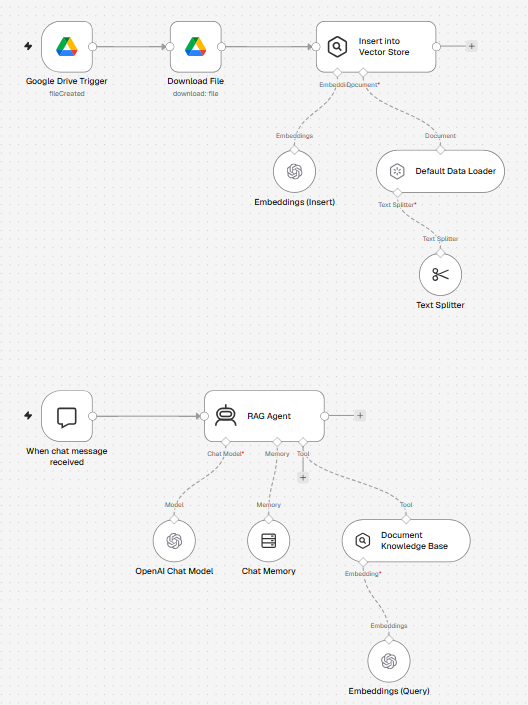
Retrieval-augmented Q&A over your own documents. Drop a file into a Google Drive folder and it is chunked, embedded and indexed automatically; then chat with an AI agent that answers only from those documents.
Live n8n canvas · exported from n8n Cloud
What it does
Drive Trigger picks up new files in a watched folder
Default Data Loader + recursive text splitter (with overlap) chunk the file, tagged with file name and ID
OpenAI embeddings stored in a vector store
RAG Agent (GPT-4o, low temperature, chat memory) uses the store as a search tool and refuses to answer beyond the documents
Tested
Successful ingestion and chat runs on n8n Cloud
Published (active) on the Drive and chat triggers
Google Drive TriggerVector StoreOpenAI EmbeddingsText SplitterAI AgentMemoryRAG
Upload an audio file through an n8n form and get back a clean, structured summary: OpenAI Whisper transcribes the recording and an LLM organises it into key points, actions and follow-ups.
Live n8n canvas · exported from n8n Cloud
What it does
Form accepts mp3, m4a, wav, ogg, webm and mp4 uploads
OpenAI audio transcription turns speech into text
GPT-4o-mini summarises under 1,500 characters with bullet points
Highlights main points, action items and follow-ups
Send a voice note to a Telegram bot and it lands in Notion as a titled, summarised page. The recording is transcribed, condensed into a title plus 3–6 bullet points, and saved with the date and sender.
Exports are sanitised: credentials, Google Sheet IDs and personal email addresses are removed. After importing, connect your own credentials (OpenAI, Google Sheets, Gmail, Google Drive, Google Contacts, Slack, WhatsApp, Telegram, Notion as needed) and replace placeholders such as YOUR_GOOGLE_SHEET_ID and YOUR_DRIVE_FOLDER_ID.